
📅 August 23, 2026
Back to School 2026: The 7 Best Student Laptops and Why Prices Exploded
Buying a laptop this year costs 15–30% more than last year — and it isn't a markup, it's a memory shortage. Which models still make sense, how to avoid the 8GB RAM trap, and should you buy now or wait? An honest guide with August 2026 pricing.
Back-to-school shopping is oddly difficult this year. The problem isn't a lack of options — it's that the laptop you bought for $700 last year now costs $850, and the retailer isn't offering you a single new feature for the difference.
The cause is simple and uncomfortable: memory. Tom's Hardware reported that conventional DRAM contract prices rose roughly 60% in a single quarter this spring, and IDC expects DRAM and NAND supply growth to stay below historical norms all year. The most visible consequence for students: Apple raised the MacBook Neo's price by $100 on June 25, 2026, from $599 to $699, and raised MacBook Air pricing at the same time. The net effect is a market where new laptops cost 15–30% more than they did last year.
This guide doesn't ignore that. Below are seven laptops, but more importantly, clear answers to three questions: what you can compromise on, what you can't, and whether buying this year is smart or foolish.
Learn the Rule First: In 2026, RAM Is Everything
You could evaluate fifteen different specs when buying a laptop. But this year there's one golden rule.
Four specs matter more than the rest, starting with memory: 16GB of RAM is the 2026 floor, and it is the single biggest factor in how many apps and tabs you can run at once. On Windows the rule is blunt: if you're choosing between more RAM or more SSD, always take the RAM — it's usually soldered, while storage you can expand externally.
Here's why it matters so much. The $500 HP OmniBook 3 offers a great OLED panel but only 8GB of RAM — and it's worse here because this is Windows on ARM, so anything not compiled natively runs through emulation, which eats memory. For a kid doing homework and YouTube, go for it. For an actual college student with 30 tabs, a PDF, Spotify, and Teams calls all at once, get 16GB.
Memory is the one component you usually can't add later on a thin laptop, so paying $75 now to double it is a reasonable hedge. There's a resale angle too: base-configuration machines with the minimum RAM depreciate faster than mid-tier configurations, because the used market prices them as already-obsolete.
The rule in short: Cut storage, cut screen quality, cut CPU if you must — don't cut RAM.
 ₺44.999
This is Apple doing something it hadn't done in a decade. Apple spent ten years telling everyone the entry point to the Mac was near four figures. The MacBook Neo, released in March 2026, blows that doorway open as Apple's cheapest laptop even after the June 2026 price reset. It exists for one reason: to stop students, schools, and casual buyers from defaulting to a Chromebook or an iPad with a keyboard. The real story is the chip. Instead of an M-series processor it uses the A18 Pro from the iPhone 16 Pro (TSMC 3nm) — the first Mac to run an iPhone-class chip. And the performance is real: it outperforms the M1 MacBook Air on Geekbench 6 single-core (3,461 vs ~3,200) and handles 4K video editing adequately. Fanless passive cooling means completely silent operation. The limits are equally clear: an 8GB unified memory ceiling with no upgrade option, USB 2.0 on the right port, no Thunderbolt 4, no external display above 4K@60Hz, no keyboard backlight on the base model, and 20W charging only. There's an unexpected bonus: repairability. iFixit rated it Apple's most repairable laptop in 14 years — screwed battery, no parts pairing, modular ports. For a student keeping a machine four years, that's real value that never shows up on a spec sheet. Pros: - Apple's cheapest laptop ever, dropping to $499 with the education discount - Beats the M1 MacBook Air on Geekbench single-core - 16-hour battery life, premium aluminium build, and full Apple Intelligence support - Fanless — completely silent in a library - Available in Silver, Blush, Citrus and Indigo - macOS ecosystem and long software support Cons: - The 8GB memory ceiling is fixed and cannot be upgraded - The base 256GB model has no Touch ID; the 512GB model adds it - No Thunderbolt 4, no fast charge, and an sRGB display rather than the MacBook Air's P3 wide colour - Uses a slower SSD to hold the price point - Starts at $699 after the June 2026 increase; the 512GB Touch ID model at $799 Best for: Students, first-time Mac buyers, writers and everyday users: buy it. Developers, video editors, or anyone needing Thunderbolt 4 or more than 8GB of RAM: get the M5 MacBook Air instead.
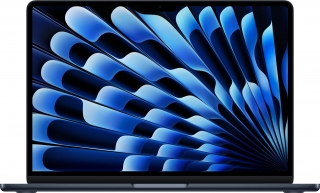
If the budget is there and you want one machine to carry you to graduation, the debate ends here. The MacBook Air (M5) is the best MacBook for most buyers because it offers the strongest balance of price, portability, battery life and performance. The 13-inch is light, quiet, and fast enough for everyday work. The 2026 refresh brings serious upgrades. An M5 chip with a 10-core CPU and next-gen 10-core GPU, 16GB unified memory and 512GB storage as standard, Wi-Fi 7 and Bluetooth 6, up to 18 hours of battery life with fast charging, and a 12MP Center Stage camera — a meaningful upgrade if you live on Teams, Zoom or FaceTime. Doubling storage year-over-year while keeping 16GB of RAM at the same $1,099 price is a notable move in the middle of a memory shortage. The gap between Neo and Air isn't marketing, it's physics. The M5's 10-core CPU and 10-core GPU are in a different league than the A18 Pro. The Air now sits meaningfully above the Neo after Apple's June 2026 list-price reset. For that extra money you get the full M5, up to 32GB of memory, a brighter Liquid Retina display, and far more sustained performance. Pros: - 16GB memory and 512GB storage as standard — few brands offer this at the price in 2026 - Up to 18 hours of battery — a full day of classes without hunting for an outlet - The 12MP Center Stage camera is a real difference-maker for online classes - Thunderbolt 4, dual external display support, and a backlit keyboard - The right chip tier for general users, students and office work - Available in 13-inch and 15-inch sizes Cons: - Starts at $1,299 for the 13-inch and $1,499 for the 15-inch — the $600 gap from the Neo is real - Pricing is volatile right now; the same model lists at meaningfully different prices across retailers - Not suited to gaming or CUDA-dependent workloads - Windows-only university software won't run on macOS — engineering and architecture students should check first Best for: Professionals and power users who need 16GB of RAM, Thunderbolt 4, dual external display support, and the performance headroom to run demanding workloads for years. Anyone hoping to get through a four-year degree on one machine.
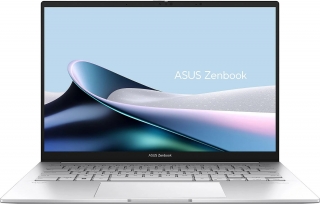
If you need Windows and have a mid-range budget, start here. The ASUS Zenbook A14 is the best all-around value on this list: 16GB of RAM, a backlit keyboard, and face unlock. Having all three together is rarer than it sounds. Most laptops in this bracket ship with 8GB, skip the keyboard backlight, or reserve Windows Hello face unlock for a higher trim. The Zenbook A14 delivers all three, which eliminates the "I bought a cheap laptop and now it annoys me daily" scenario. For a student taking notes in a library at night, a backlit keyboard isn't a luxury. The real value here is that it isn't the best at anything. The screen isn't as good as the MacBook Air's, the processor isn't as strong as the Zephyrus G14's, and the price isn't as low as the Latitude 5430's. But it isn't unacceptably bad at anything either — which is precisely what you want from a device you'll open every day for four years. Pros: - 16GB of RAM as standard — meets the 2026 Windows floor - Backlit keyboard and face unlock are unexpected at this price tier - 14-inch chassis is ideal for students moving between buildings - No glaring weaknesses in everyday use - Wide service network in most markets Cons: - Nothing about it stands out; "good but not exciting" - No discrete GPU — unsuitable for gaming or GPU-accelerated work - No OLED option on this model - List pricing shifts frequently due to the memory shortage Best for: Students who don't know exactly what they need and just want "a good laptop." More than enough for social sciences, business, law and communications.
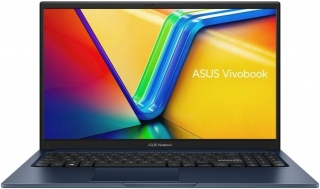
Sometimes the right answer is the boring one. For most students, the $619.99 ASUS Vivobook 15 Touch is the smart middle-ground buy, with the memory and storage to stay comfortable for years. The touchscreen has a genuine function here, and it's usually underrated. Pre-med students marking up diagrams, architecture students sketching thumbnails, and anyone who reads hundreds of pages a week all benefit from a touchscreen more than they expect. Annotating a PDF, scrolling, or quickly flagging a table — these are micro-actions repeated dozens of times a day. The 15-inch size is a trade-off, though. Screen real estate is a blessing at a desk and a burden in a backpack. Ask yourself honestly: does your laptop mostly sit on a dorm desk, or does it live on your back? If it's the latter, look at a 14-inch model instead. Pros: - At $619.99, the memory and storage balance holds up for years - The touchscreen is a real convenience for note-taking and PDF work - 15-inch display is comfortable for long writing and spreadsheet sessions - Broad port selection — important for campus projectors and external displays - Good service and parts availability Cons: - The touch panel shortens battery life and makes the display more reflective - The 15-inch chassis is noticeably more tiring to carry daily than a 14-inch - Display quality trails OLED alternatives - Build quality and design reflect the price Best for: Students whose work is note-taking and reading heavy, using the laptop mostly at a fixed desk. Especially valuable for medicine, law and architecture students.
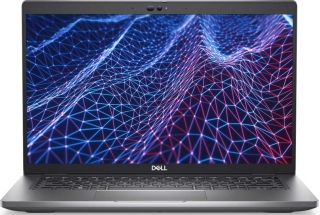
This is the most honest recommendation on the list. Not everyone has a thousand-dollar laptop budget, and that isn't a failing. If your budget genuinely stops around $400, the Dell Latitude 5430 is a remarkable amount of laptop for the money. It pairs an Intel Core i7-1255U with 16GB of RAM and a 256GB SSD, which is more than enough for writing, research and video calls. As a business-class machine it also has a sturdy chassis and a comfortable keyboard built for all-day typing. Add an external drive later if 256GB feels tight. The caveat: this is a corporate fleet device, usually sold refurbished. That means the design isn't fashionable, the battery probably isn't at original capacity, and the warranty may be limited. In exchange you get keyboard quality and chassis rigidity you simply cannot find on a new laptop at the same price. In a market where new laptops cost 15–30% more than they did last year, the corporate refurb segment makes more sense this year than it has in a long time. Pros: - A Core i7-1255U with 16GB of RAM for roughly $394.99 - Business-class chassis and a keyboard built for all-day typing - The cheapest way to hit the 2026 16GB floor - Abundant corporate spare parts; cheap to repair - The segment least affected by the price crisis Cons: - 256GB of storage is tight; an external drive may be necessary - Usually sold refurbished — always check battery health and warranty terms - Mediocre display, purely functional design - No next-gen features: no Wi-Fi 7, no NPU, dated webcam - Heavier and thicker than current standards Best for: Students on a hard budget, anyone needing a second machine, and people who'll use a laptop purely for writing, research and attending class. Not for anyone who cares how it looks.
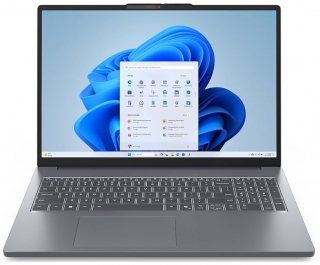
Some degrees genuinely demand work from your machine. The Lenovo IdeaPad Slim 3i Gen 11 is $899.99 with an Intel Core Ultra 7 355, 16GB of RAM, a 512GB SSD and a 15.3-inch 120Hz touchscreen — good for a full Windows class load and everyday campus ports. The operative phrase is "full Windows class load." A college laptop has one hard job: make the next four years less annoying. That means it needs enough memory to keep a research paper, a video call, a dozen browser tabs, and whatever campus portal your school insists on using from turning into a small emergency. SPSS, light AutoCAD, MATLAB, virtual machines — all of these eat 16GB fast, and a 120Hz panel measurably reduces eye strain over a day of scrolling. Let's be honest about price: $900 is serious money for a student laptop. Most of the useful choices this year sit between $600 and $1,200 — spend less and you start negotiating with tiny storage, weak screens, or a processor that may feel limiting before graduation. The IdeaPad Slim 3i lands in the middle of that range without forcing a compromise in any category. Pros: - Core Ultra 7 355, 16GB of RAM and a 512GB SSD form a balanced combination - A 15.3-inch 120Hz touchscreen — 120Hz is rare at this price tier - Broad port selection suited to campus use - Lenovo keyboard quality is dependable over long writing sessions - Next-gen NPU-equipped processor keeps local AI features viable Cons: - $900 exceeds most student budgets - No discrete GPU — insufficient for gaming or heavy rendering - The 15.3-inch body isn't ideal for daily carry - Battery life trails ARM-based and Apple rivals - Chassis materials feel ordinary for the price Best for: Engineering, data science, architecture and business analytics students. Anyone running several heavy applications at once.
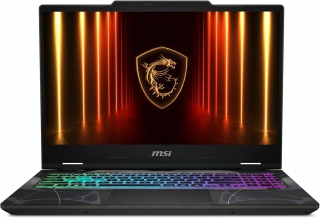
Let's be realistic: plenty of students aren't buying a laptop purely for class. Plenty of students need a machine that handles coursework by day and games at night, and a dedicated GPU is the only way to get there. The MSI Cyborg A15 at $967.77 pairs a Ryzen 7 260 with an RTX 5050 laptop GPU and a 15.6-inch 144Hz display, which is a sensible combination: the 144Hz panel makes fast games feel smooth, and the discrete GPU also accelerates video editing and anything that leans on CUDA. That last clause matters. A discrete GPU isn't only a gaming feature. Video editing, 3D modelling, machine learning assignments and Blender renders all benefit from it. So for a computer science or digital design student, this isn't a "gaming laptop" — it's the correct tool. But the trade-offs are real and worth stating plainly. Gaming laptops are heavier and warmer than the thin picks above, and battery life under load is measured in a couple of hours rather than a workday. Expect to carry the charger to every class. Fan noise in a quiet library is another consideration. Pros: - The RTX 5050 accelerates video editing and CUDA workloads, not just games - The 15.6-inch 144Hz panel makes a visible difference in fast-paced games - One of few options with a discrete GPU under $1,000 - Balanced thermal design for a gaming laptop - Upgradeable RAM and storage, unlike most thin laptops Cons: - Noticeably heavier and warmer than thin alternatives - Battery life under load is a couple of hours, not a workday - Fan noise can be disruptive in quiet environments - Gamer aesthetic stands out in internships and presentations - Bulky power brick adds real weight to the bag Best for: Computer science, digital design and game development students, plus anyone who games seriously alongside coursework. If you only need a laptop for class, you're overpaying here.
This is the most-asked question in this guide, and the honest answer splits in two.
If you start school in September: buy. Waiting achieves nothing, because prices aren't dropping soon. IDC expects DRAM and NAND supply growth to stay below historical norms all year. There's no signal you'll pay less in October or November. Meanwhile back-to-school promotions are at their peak right now.
If your current laptop still works: wait. This may be the worst year in recent memory to upgrade. The same money bought a better machine last year, and you're getting no new feature for the difference.
One more tactic: whatever ends up in the backpack this fall, the machine it replaces is depreciating in a drawer right now — and in a market where new laptops cost 15–30% more than they did last year, that trade-in value covers a bigger share of the upgrade than it used to. Sell or trade in your old laptop; that money means more this year than usual.
Finally, always check education pricing. Education pricing still takes $100 off, which puts the 256GB MacBook Neo back at its original $599 for students, teachers, and parents buying for an enrolled student. Retailers may also still be selling remaining stock at launch pricing — Tom's Guide reported that Best Buy still had MacBook Neo units at $599 after Apple's increase. Compare Apple, authorised retailers and the education store before checkout.
CONCLUSION
The rules for buying a student laptop changed this year. Reduced to a single sentence: look at the RAM, not the price tag.
Short version: Dell Latitude 5430 on a hard budget, MacBook Neo for best value, MacBook Air M5 if you want one machine for four years, Zenbook A14 for a balanced Windows pick, Vivobook 15 Touch for mid-range, IdeaPad Slim 3i for heavy workloads, and MSI Cyborg A15 for gaming and GPU work.
One last thought: the best laptop isn't the one that looks best on a spec sheet — it's the one that doesn't annoy you for four years. Which makes sense for your degree? Drop your major in the comments and let's work it out.
Frequently asked questions
What is the most important specification to consider when buying a student laptop this year?
This year, the golden rule is that RAM is everything. 16GB of RAM is the 2026 floor, and it is the single biggest factor in how many apps and tabs you can run at once. It's usually soldered, so it's the one component you typically can't add later on a thin laptop.
Is it a smart decision to buy a new student laptop this year, given the current market conditions?
If you start school in September, buying now is recommended as prices aren't expected to drop soon, and back-to-school promotions are at their peak. However, if your current laptop still works, waiting might be better, as this may be the worst year in recent memory to upgrade due to higher prices for similar machines.
What can students do to mitigate the higher prices of laptops this year?
Students can consider selling or trading in their old laptop, as its trade-in value covers a bigger share of the upgrade than it used to. Additionally, always check for education pricing, which can offer significant discounts, such as $100 off the MacBook Neo for eligible buyers.
Which specific laptop models are recommended for different student needs in 2026?
For a hard budget, the Dell Latitude 5430 is suggested. The MacBook Neo offers the best value, while the MacBook Air M5 is recommended for a machine intended to last four years. The Zenbook A14 is a balanced Windows pick, the Vivobook 15 Touch is for mid-range needs, the IdeaPad Slim 3i for heavy workloads, and the MSI Cyborg A15 for gaming and GPU work.